
What's new in November 2026
Branded guest emails, multi-step to-dos, messages and reminders by condition, and a round of smaller improvements, live 6 November 2026.
This release went live on 6 November 2026. Everything below is in the organizer console now. Where guests see something new in the Attend app, it’s noted.
Your brand on every guest email
Guest emails now come from your name, not “Attend”: Kardoe via Attend, or your event’s brand kit or client name. Replies go to your host email, and you can change the reply-to address.
Settings → Guest emails is rebuilt around the email you’re editing. Pick an email, edit only the fields it uses, and see a live preview beside it. The invitation has a version for each guest situation (New, Confirm pending, Going, Waitlisted, Plus-one), and the approval, waitlist, ticket, import and reminder emails each get their own editable headline and message. Formatting you add (bold, links, lists) is kept in the email guests receive.
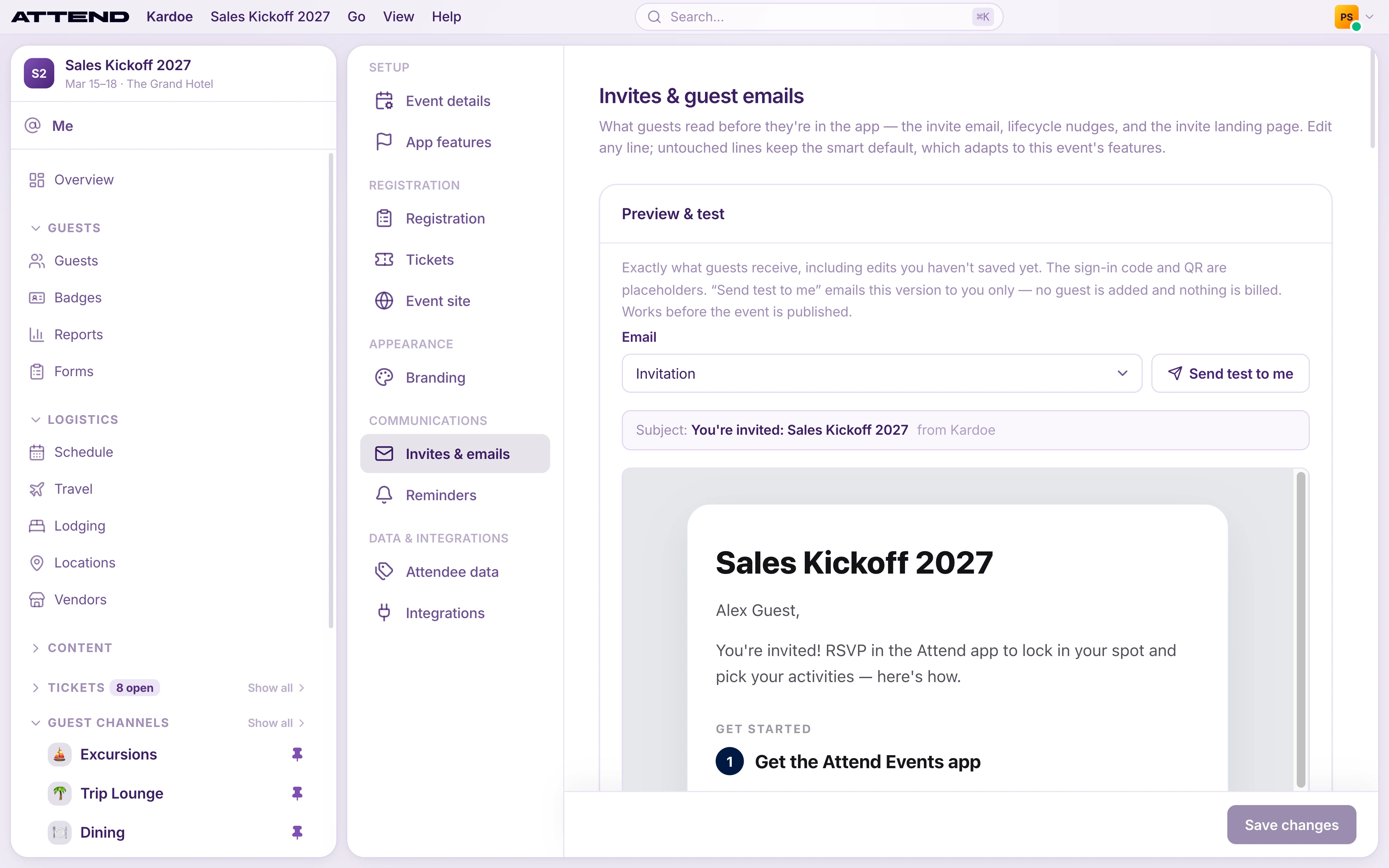
Every image field in Branding now shares one library of the event’s uploads, with a crop tool that frames each image at the size it needs. Branding also shows the Email sender and has a new Event list icon card.
Messages and the reminders you write now go out in a plain, easy-to-read email with its own wide banner, set in Guest emails → Notifications → Messages & reminders. It ends with a link guests can use to message you in the Attend app.
Read more: Write your invite · Brand your event
To-dos with steps
Forms is now To-dos. One to-do can hold up to 10 steps: questions, a checkbox, add your flight, add your hotel, choose sessions, a waiver and the official dietary, accessibility and emergency-contact forms. Flight, hotel and session steps tick themselves off when the guest adds a booking or picks a session. To-dos can have a due date, and the list shows how many guests have finished each one.
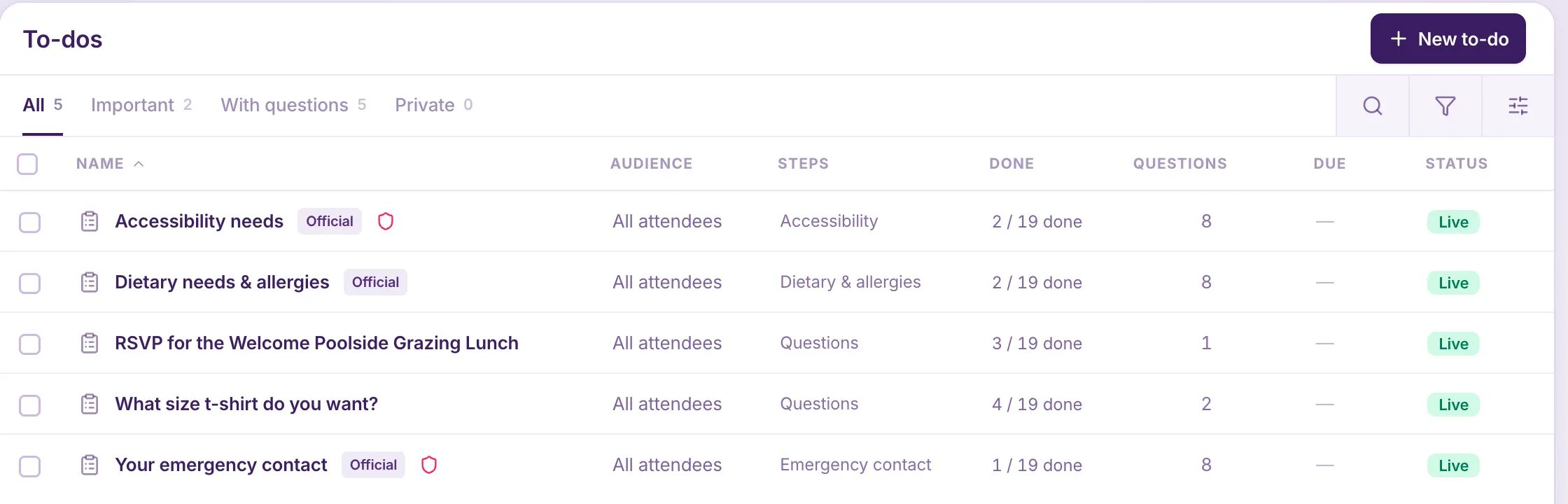
Guests see multi-step to-dos, progress and due dates from version 1.6 of the Attend app. Until your guests have it, keep to-dos on live events to a single step.
Read more: Ask guests to do things with to-dos
Messages and reminders by condition
Message people is now Messages: choose who, write the message, review it. Add a condition such as hasn’t added a flight or hasn’t finished a to-do and Attend finds the guests who still need to act. Each guest’s email and push fill in their name, what they’re missing, and a link that opens the right screen in the app.
Reminders can now send the same nudges on a schedule: before a to-do is due, or to anyone still matching a condition, with repeats. Older events that never had the confirm-your-spot nudges get an Add default nudges button.
Read more: Message guests who still need to act · Set up reminders
Smaller improvements
- Typeahead pickers: choosing a person or a time zone is now search-as-you-type.
- Quieter pages: explanations moved into the ⓘ button beside each field.
- Attach to schedule: attach a document, link or file to a session, activity or choice group.
- Private session invite lists: invite or uninvite guests from a private session. Uninviting frees the seat for the waitlist.
- Channel audiences: build a guest channel from any mix of groups, such as ticket type, hotel, plus-ones, a flight or hand-picked guests. Internal channels can include the whole event crew.
- To-dos in chat: share a to-do or form in a chat message as a card guests can open.
- Travel review: travel that guests enter themselves gets a Needs review tab and an Entered by filter.
- Hotel dates: check-in and check-out are dates only, with no times.
- Documents: rename a document, change its type, unpublish it, or go back to an earlier version from its ⋮ menu.
- Faster push notifications: they now arrive within about a second.
- Event-level access: give someone access to one event only, or view-only access, without adding them to the whole organization.
Good to know
- After this update, some guests may be asked to sign in to the app once more, with their email and the code we send them.
- Each organization’s event data now sits in its own isolated store.